Contents
Getting started
- Welcome to NyrexVJ
- Installing and first start
- The window at a glance
- Your first show in five minutes
Playing visuals
- The clip grid
- Decks and transitions
- Layers and blending
- The Clip window
- Effects
- The Library
- Presets and sessions
- The Master window
Music and motion
Your own content
- Video and image clips
- Your own shaders
- 3D models
- The Clip Creator
- Text, particles and effect chains
- The node effect editor
- Live sources: Spout, NDI and cameras
Output and recording
Live control and shows
- Control: MIDI, OSC and the web page
- Show sync and timecode
- The show timeline
- Stage: DMX, VRSL and VRChat
- Plugins
Reference and help
Manual / Playing visuals
The Master window
#Level and blackout
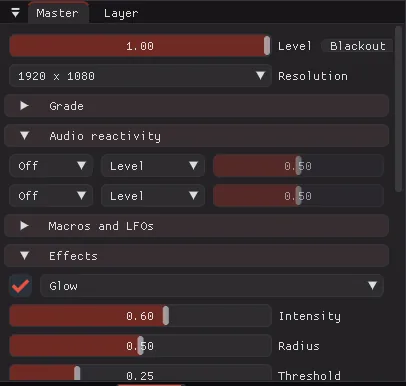
Level at the top is the brightness of the final picture from 0 to 1, a master fader. Blackout turns the whole picture black at once and back again, also with the key B. It is the emergency stop of your show and it is available by MIDI and OSC as well.
#Resolution
The Resolution list sets the size of the final picture: 960 x 540, 1280 x 720, 1920 x 1080 (the default) or 2560 x 1440. A smaller size is easier on the graphics card. The output windows scale the picture to their own size, so the resolution here is the quality of what is rendered.
#Grade, reactions and effects
The Grade section has Hue, Saturation, Brightness and Contrast for the whole picture, and Reset grade. Audio reactivity works like the slots of a layer. The Macros and LFOs section holds the eight macro knobs and four LFOs, see Macros, LFOs and the beat grid. Effects are the four master effect slots, see Effects.
Found a mistake or something missing? Tell us on GitHub. The same manual is built into the program, so you have it without internet. Open it with F1 or from the Help menu, then User manual.